Planning, documents, activities, assessments, presentations… Back-to-school season can turn your to-do list into an endurance test.
The good news is that you can use AI for lesson planning in far less time. It isn’t here to replace your judgment as an educator, but to speed up the most repetitive parts of your work so you can put more energy into what really matters: teaching, supporting, and connecting with your students.
Ready to go from chaos to control? Here are five ways to do it with Genially.
How can AI help with lesson planning?
Using AI for lesson planning can streamline content creation and save you from starting from scratch. AI can turn your ideas or existing documents into interactive, customizable educational materials and activities.
You stay in control of the content, level, and teaching approach while the technology prepares a first draft for you to build on.
1. Turn your documents into interactive materials
That PDF you’ve been using for several school years still has plenty to offer. It just needs a little interactive boost and a creative refresh.
Generate a Genially with AI turns an idea or source material into a complete, editable, interactive genially. Start with a unit plan, a reading, a review guide, or any other material you’ve already prepared.
Instead of facing a blank canvas, you get a starting point with:
- A clear structure
- Organized content
- Visual elements
- Interactivity
- A design you can edit and customize
With AI for lesson planning, you don’t have to start from scratch. You can reuse your existing content in a different, more dynamic and participatory way by adding buttons, windows, questions, or multimedia resources that bring static content to life.
A standard PDF can inform. An interactive resource invites students to explore, choose, and participate.
2. Create a welcome experience your students will want to explore
The first day of class isn’t just for explaining rules and schedules. It also sets the tone for everything that follows. You can use AI to create an interactive welcome guide that brings together:
- An introduction to the course
- Important dates
- Required materials
- Classroom rules
- Communication channels
- A short icebreaker activity
This is a great place to use Genially’s AI components. These interactive resources are generated with artificial intelligence and refined by our team, ready for you to add to an existing genially. They let you add a specific activity or interactive resource without building the whole thing from scratch.
For example, you can include activities like matching concepts, a word search, or bingo. You can also create interactive questions, such as a “Would You Rather?” quiz, a student interest survey, or a short game to find out what everyone expects from the course.
3. Create the interactive resource you have in mind with help from AI
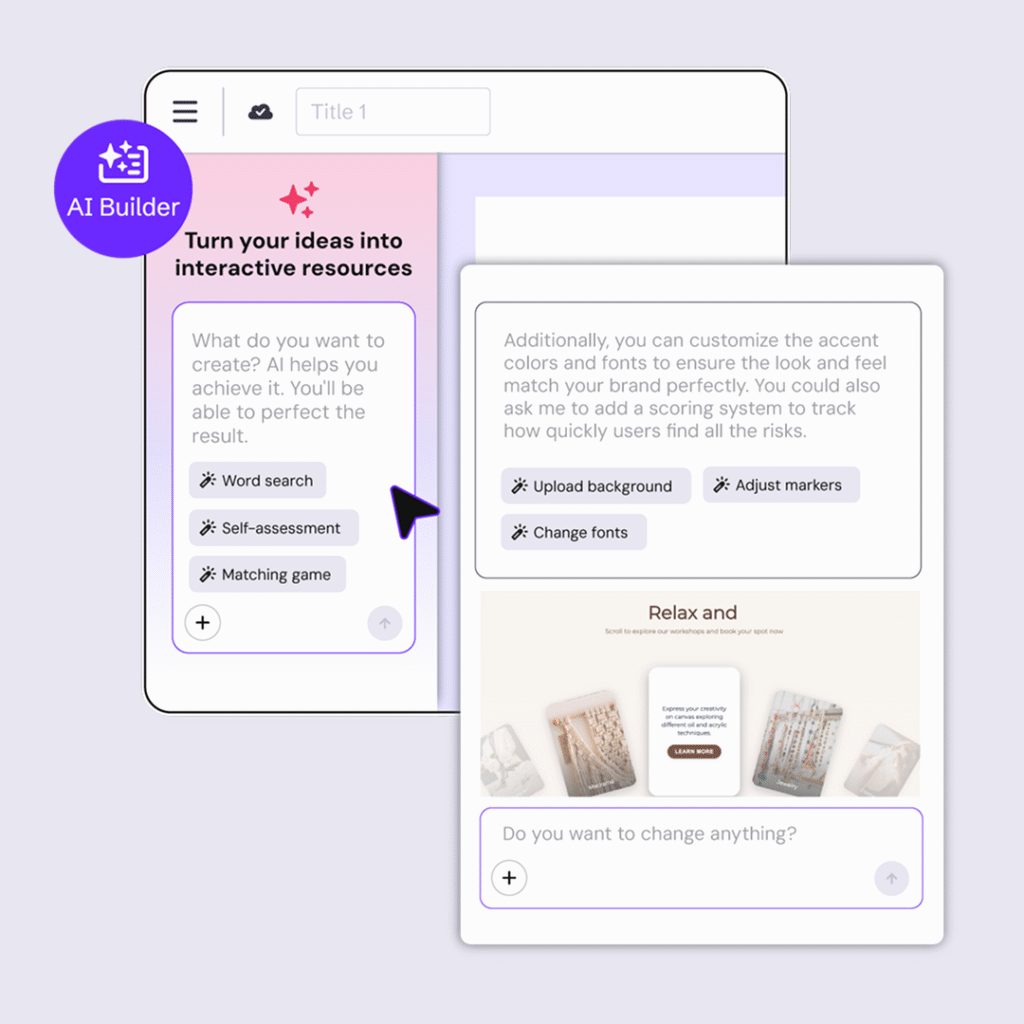
With AI Builder, you can generate interactive components to make your classes more engaging. It’s simple: describe your idea, add any reference files or images you have, and AI Builder generates the resource for you.
HELP CENTER
How to create with Genially AI Builder
Got an idea? Shape it with AI Builder. This is a new way to create interactive resources without touching any code—just through a conversation.
You can also chat with AI to refine the result, adjusting the format, tone, difficulty, or learning objective as you go.
Want to create a game for practicing French verbs? Just ask. Prefer an interactive timeline? You can do that too. Need a decision-making activity where every choice opens a different path? Go for it.
Try specific instructions such as:
- “Adapt the vocabulary for 12-year-old students.”
- “Include four challenges with increasing difficulty.”
- “Use a friendly tone, but don’t make it childish.”
- “Add feedback after each answer.”
- “Turn the activity into a ten-minute review.”
This conversation helps you fine-tune the idea before building it. That way, you make better use of your AI credits and, most importantly, stay in control of the learning experience.
AI for lesson planning works best when you don’t just ask for “something creative,” but explain what your students should learn, practice, or discover.
4. Assess knowledge without turning everything into a test
Finding out what your students already know doesn’t have to mean an intimidating or formal exam. To check what they remember from last year, create quizzes, sorting games, open-ended questions, or polls for a lighter, more participatory knowledge check.
You can collect responses while your students actively engage with the content. This approach helps you identify prior knowledge, reinforce concepts, and provide immediate feedback without interrupting the flow of the session.
With Genially, you can use AI to generate interactive questions from your own materials and prepare review activities faster.
Tracking data also gives you insight into responses, interactions, and progress. Premium plans include metrics and individual tracking, so you can better understand how students interact with the content.
This helps you identify:
- Which concepts are clear.
- Where students are making the most mistakes.
- Which students may need support.
- What content to review before moving on.
The result is an assessment that feels less intimidating for your students and is much more useful for you.
5. Get the whole class involved
An interactive experience is even better when it isn’t limited to the teacher’s screen. With Present Live, you can share questions, polls, and challenges so students can participate from their own devices while you control the pace of the activity.

Live sessions can bring together up to 200 participants on premium plans and display results or leaderboards during the activity.
Use them to:
- Break the ice.
- Review before an assessment.
- Check understanding of a topic.
- Vote on different options.
- Solve a team challenge.
How to use AI for lesson planning without losing control
The key isn’t to generate more content. It’s to generate the right content and turn it into an experience with a clear objective.
Before you begin, ask yourself three questions:
- What do I want to achieve? Decide whether the resource will introduce, explain, practice, assess, or review.
- What should my students do? Don’t just think about what you want to tell them. Decide whether students should explore, respond, choose, connect ideas, or make decisions.
- What can AI speed up? Use it to organize a first draft, generate questions, adapt text, suggest a structure, or transform existing material.
Then it’s your turn to review, edit, add context, and give every interaction a purpose. The goal is to make the content clearer, more memorable, and easier to explore without spending hours and hours preparing it.
Spend less time preparing materials and more time teaching
Using AI for lesson planning doesn’t mean letting AI decide what to teach or how to connect with your students. It’s there to help you transform documents, unlock ideas, create activities, and speed up tasks that used to take up a large part of your week.
Because preparing for the school year shouldn’t feel like a second job.